
Build a gym app for your members with AI
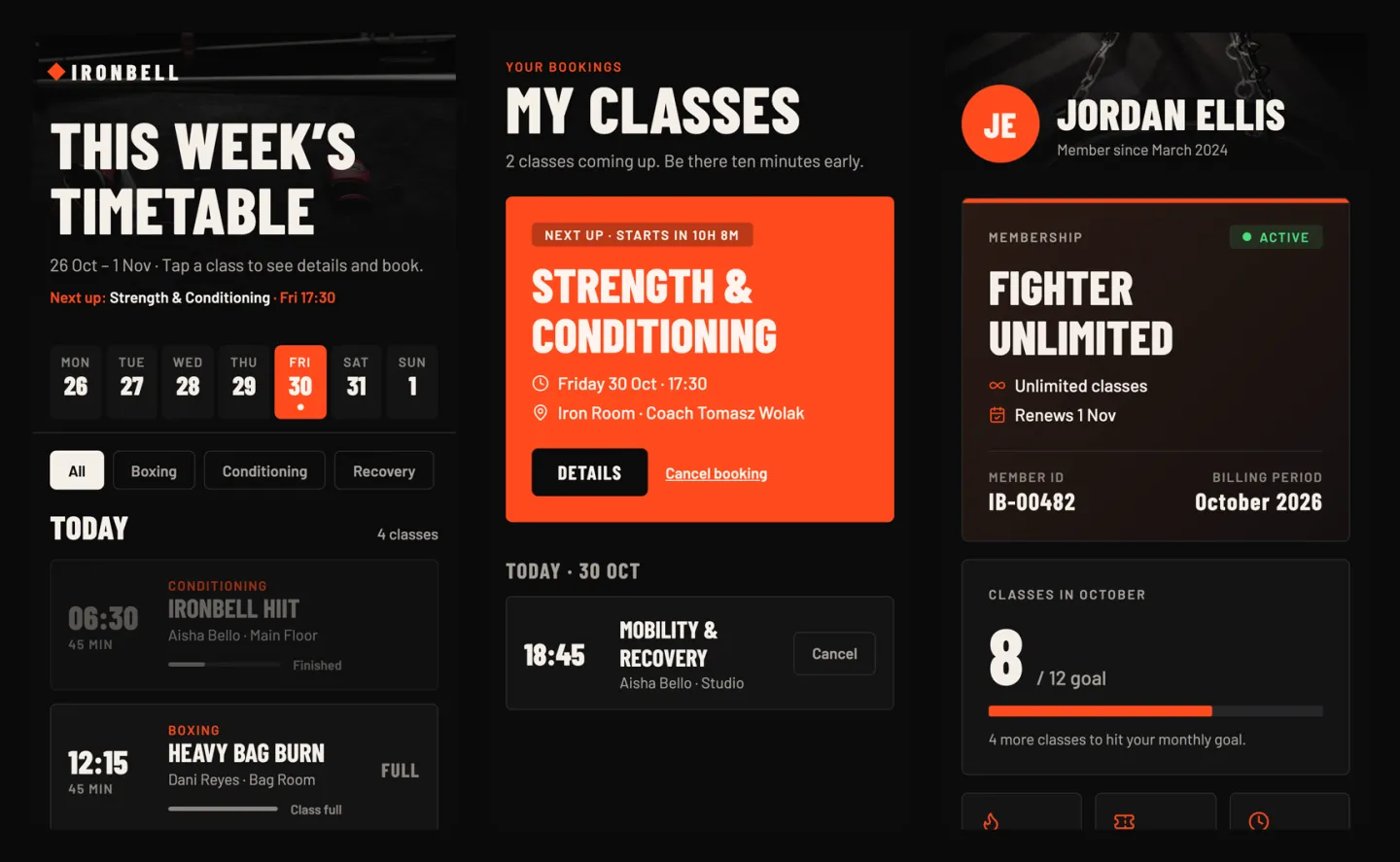
We typed one paragraph into GenVibe’s Mobile App tab, the way a gym owner would. Nine minutes later we had a members’ app: this week’s classes with spots left, booking and cancelling, and a profile with the membership and classes done this month. It runs on Android and iPhone. It used 23.6 credits, about $2.36 at the smallest credit pack.
Build this puts the prompt in GenVibe for you to edit. Nothing is sent until you press send.
- First preview
- 7 min 28 s
- Finished build
- 9 min 9 s
- Credits used
- 23.6 credits
- Model
- Claude Sonnet 5.5
The prompt we typed
Written the way a business owner would write it: no technical words. Change the names, prices and details to yours.
I run a small boxing and fitness gym called Ironbell. I want an app for my members. They should see this week's class timetable, book a spot in a class and see how many spots are left, see their upcoming classes and cancel one, and have a profile page with their membership and how many classes they did this month. A bold, dark and energetic look.
What GenVibe built
One message, no follow-ups. Everything below is the first build, as the AI made it.
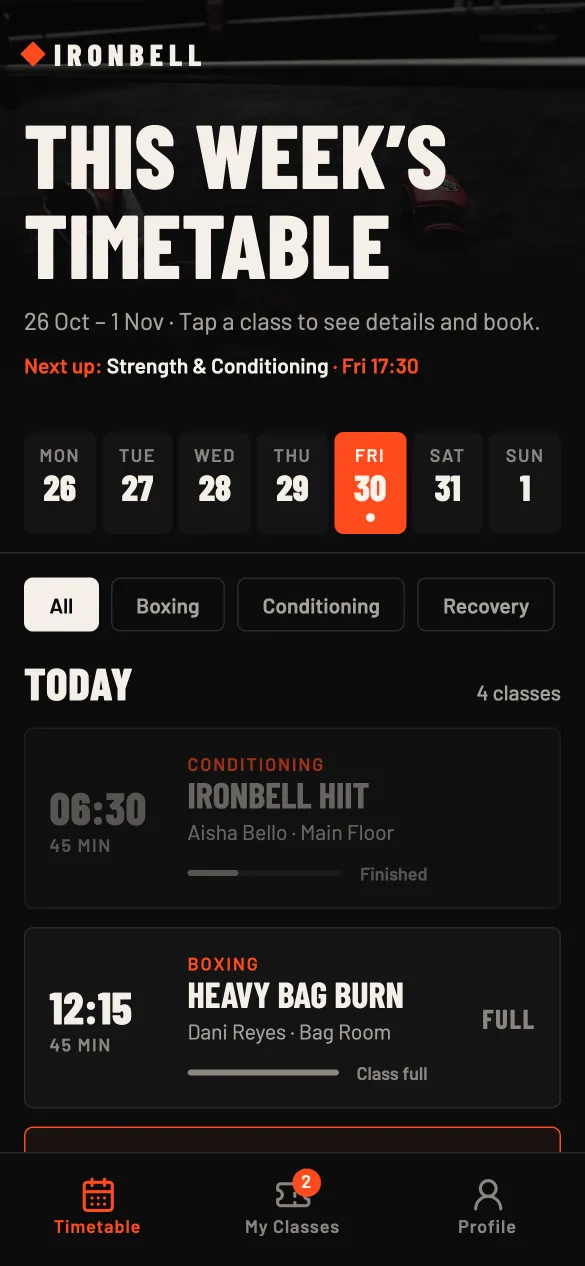
- A timetable for the week: a Monday to Sunday strip, filters for boxing, conditioning and recovery, and each class with its coach, room and a bar of spots left. Full classes say FULL.
- Booking from the class card or from the class’s own page. Full classes, classes that have started and two classes at the same time can’t be booked.
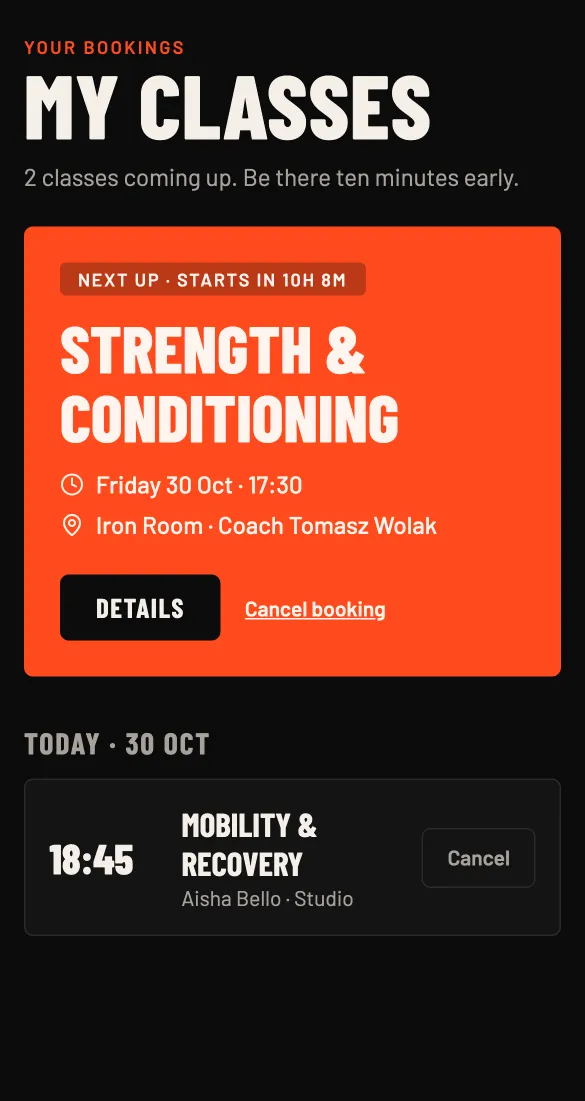
- My Classes: the next class in a large card with a countdown, the rest grouped by day, and cancel with a confirm step.
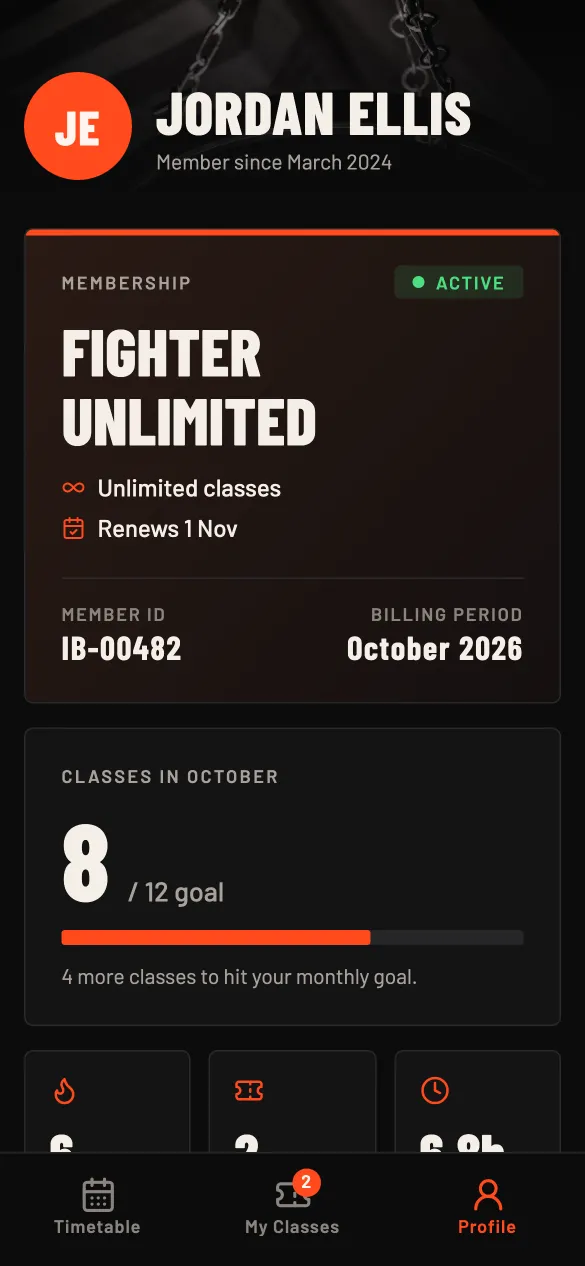
- A profile with the membership card (plan, status, renewal date, member ID) and classes this month against a 12-class goal.
- An app icon, a boxing glove with a bell, and the app’s name set to Ironbell.
How long it took and what it cost
| Time to the first preview | 7 min 28 s |
|---|---|
| Time to the finished build | 9 min 9 s |
| Credits used | 23.6 credits |
| In money, with the smallest credit pack | $2.36 ($5 for 50 credits) |
| In money, on the cheapest plan | $2.83 ($12 a month for 100 credits) |
| Model | Claude Sonnet 5.5, picked by Auto |
Measured on October 29, 2026, from pressing send until the AI finished, on a paid account where Auto picked Claude Sonnet 5.5. The same prompt won't give the same app twice: the AI writes new code each time, and on a free account Auto may pick a different model, so the minutes and credits change from run to run. New accounts get 20 free credits once, with no card; this build used more than that. See pricing.
What is sample data, and how to make it real
The first build works on its own, with sample data, so you can click through it right away. These are the parts to switch on before real customers use it.
| Part | In the demo | To make it real |
|---|---|---|
| Members | One made-up member, Jordan Ellis, with a sample membership and class count. There is no sign-in yet. | Press Connect Supabase in the project and ask the AI for member sign-up and sign-in. |
| Classes and bookings | A sample timetable. Bookings and spot counts are saved on the phone only, so members don’t see each other’s bookings. | With Supabase connected, ask the AI to keep the timetable and bookings there, so spots left are the same for everyone. |
| Class reminders | None. | Ask the AI for reminders before a class. They work in the installable Android app; the Expo Go preview can’t show them. |
| Membership payments | None. | Connect Stripe, or Razorpay in India, under Customize → Connectors and ask the AI to add a payment link for memberships. |
How to build your own gym app
- 1
Open GenVibe on the Mobile App tab
Go to genvibe.pro and choose Mobile App above the message box.
- 2
Describe your business
Paste the prompt from this page and change the names, services and prices to your own. Plain words work best.
- 3
Watch it build
Press send. The AI plans the app, writes the code and shows it in a live preview. Ours took 9 minutes.
- 4
Change anything by chatting
Ask for changes in the chat, or click a part of the preview to point at it. Each change uses a few credits.
- 5
Try it on your phone and publish
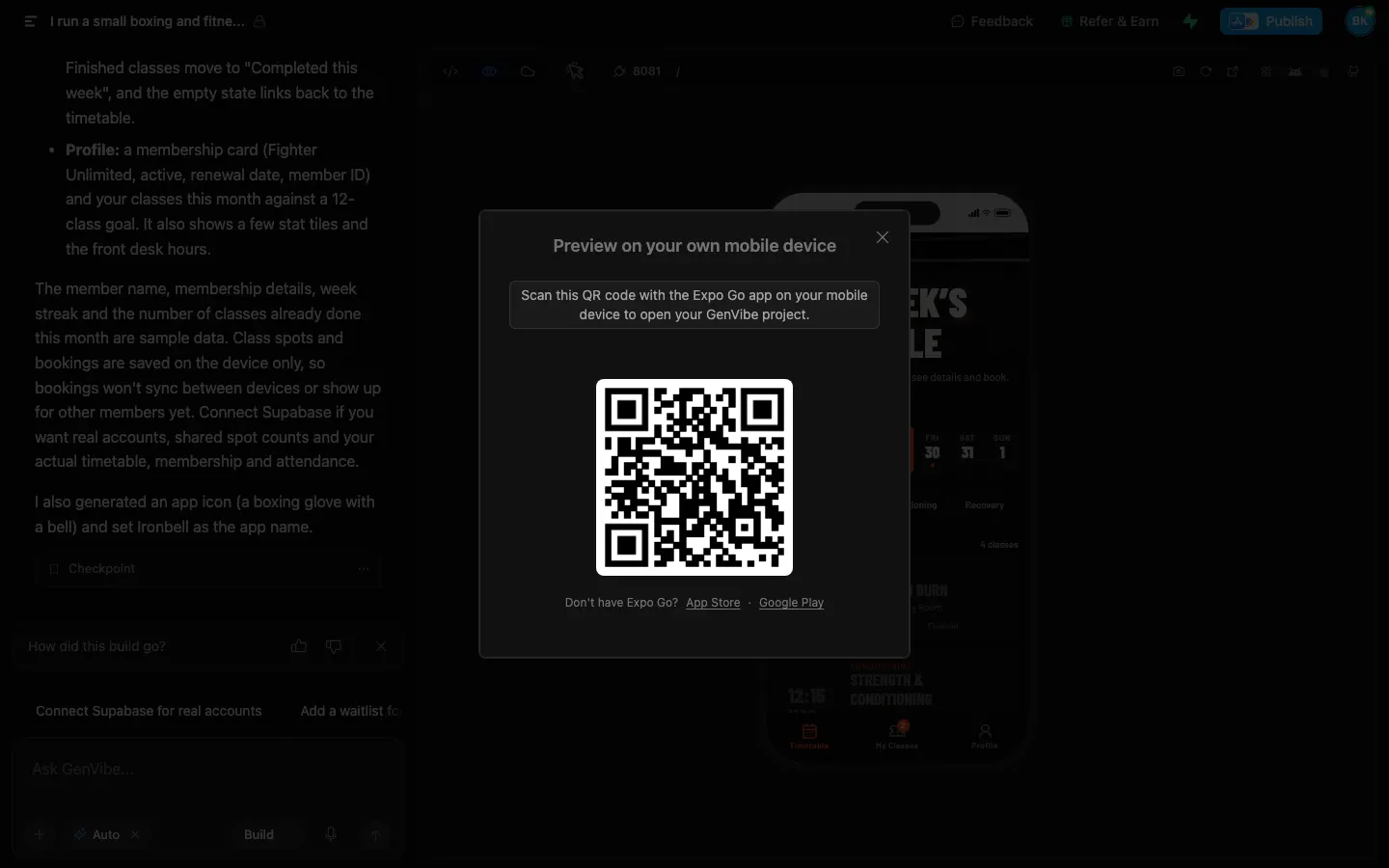
Scan the QR code with the free Expo Go app to open it on your phone. When it is ready, build the installable Android app on your own Expo account, then publish it to Google Play from the chat.
Good next messages
Send these one at a time after the first build. Each one changes the app in place.
- Here is our real timetable: (paste it). Replace the sample classes.
- Add sign-up and sign-in for members with Supabase, and save bookings there.
- Add a waitlist for full classes.
- Remind members an hour before their class.
Put it on your phone and in Google Play
On your phone while you build. Install the free Expo Go app, press the QR button above the preview and scan the code. The app opens on your phone, Android or iPhone, and updates as the AI changes it.
The Android app. GenVibe builds the installable Android app on your own Expo account, free on every plan. On a paid plan or with any credit pack, it uploads the app to your Google Play account for testing and drafts the store listing. Read the Google Play guide for the steps Google still asks of you.
iPhone App Store: coming soon. Today you can open the app on an iPhone with Expo Go while you build it.
Questions
Can I make a gym app without coding?
Yes. You describe the app on the Mobile App tab and GenVibe’s AI writes it with React Native and Expo. Our demo came from one paragraph, and we typed no code.
Does it work on iPhone and Android?
Yes, it is one app for both. While you build, you open it on your own phone with the free Expo Go app. GenVibe builds the installable Android app; App Store publishing is coming soon.
How do I put it on Google Play?
GenVibe builds the Android app on your own Expo account, free on every plan. On a paid plan or with any credit pack, it uploads the app to your Google Play account for testing and drafts the store listing. You need your own Google Play developer account.
Can members sign in and see real bookings?
Not in this first build: the member and the bookings are sample data on the phone. Connect Supabase and ask the AI for member sign-in and shared bookings.
Can I take membership payments in the app?
Connect Stripe, or Razorpay in India, under Customize → Connectors, then ask the AI to add a payment link for memberships.
How much did this cost?
This build used 23.6 credits, about $2.36 at the smallest credit pack ($5 for 50 credits). Every new account gets 20 free credits once, with no card; this build needed more than that. Plans start at $12 a month for 100 credits, and publishing to a genvibe.app address is included on every plan.
More real builds
Start from a template instead
Templates open in about a minute and use no credits.
Keep reading
Make it yours
Start with this prompt, change the details to your business, and press send. New accounts get 20 free credits once, with no card.